Dovetail
Dovetail is a web-based translation refinement tool designed to solve two of the most painful problems in our field workflow: the inability to synchronize content between translation teams and publishing, and the absence of software that supports structured refinement workflows. As lead designer, I've driven the product from stakeholder problem framing through research, competitive analysis, and iterative prototype testing — before a single production screen was finalized. This case study documents that process, the research findings that shaped key product decisions, and what it looks like to define a product category that doesn't yet exist in our ecosystem.
Overview
Problem Statement
Translation teams completing a draft face two compounding challenges that have no current software solution:
Content synchronization between field teams and the publishing department is entirely manual — when publishing corrects formatting errors, those changes don't propagate back to the source, creating duplicate correction work and version drift.
The refinement phase of translation — where teams work through spelling consistency, USFM formatting, verse structure, and linguistic accuracy — has no dedicated tooling. Teams have been improvising with word processors, spreadsheets, and workarounds that introduce more errors than they fix.
My Role
Role: Lead UI/UX Designer
Ownership: Problem definition, stakeholder research, competitive analysis, interaction design, prototype testing
Collaboration: Product owners, software developers, publishing stakeholders, field linguists
Platform: Web (desktop-first, with future mobile consideration)
Timeline: Ongoing — currently in discovery and prototype validation phase
Success Metrics
Reduce formatting errors entering the publishing pipeline through more accessible USFM management
Enable collaborative refinement workflows with minimal hardware overhead
Replace manual synchronization with a structured content handoff model
Validate core interaction patterns before committing to full development
Context: What Dovetail is Replacing
Dovetail evolves from Writer, a translation tool inherited from a third-party organization that has become increasingly difficult to maintain and use. Writer was built around a "chunks" model — content is broken into discrete structural units that require active management to navigate. In practice, this means that doing something as simple as reading through a chapter requires more interaction overhead than opening a word processor and typing. For users already managing linguistic complexity, the added structural friction is a meaningful barrier.
Beyond usability, Writer has three compounding limitations that make it unfit for the refinement phase:
Writer doesn't support collaboration (only the file creator can edit).
Writer’s underlying technology makes new feature development prohibitively expensive .
Writer has no tooling for the formatting correction work that refinement requires.
The result is that translators default to pen and paper or familiar word processors — not everyone admits to using Word, but the evidence is in the formatting errors that arrive downstream — then reluctantly transfer content into Writer, introducing the very structural problems that publishing teams have to correct.
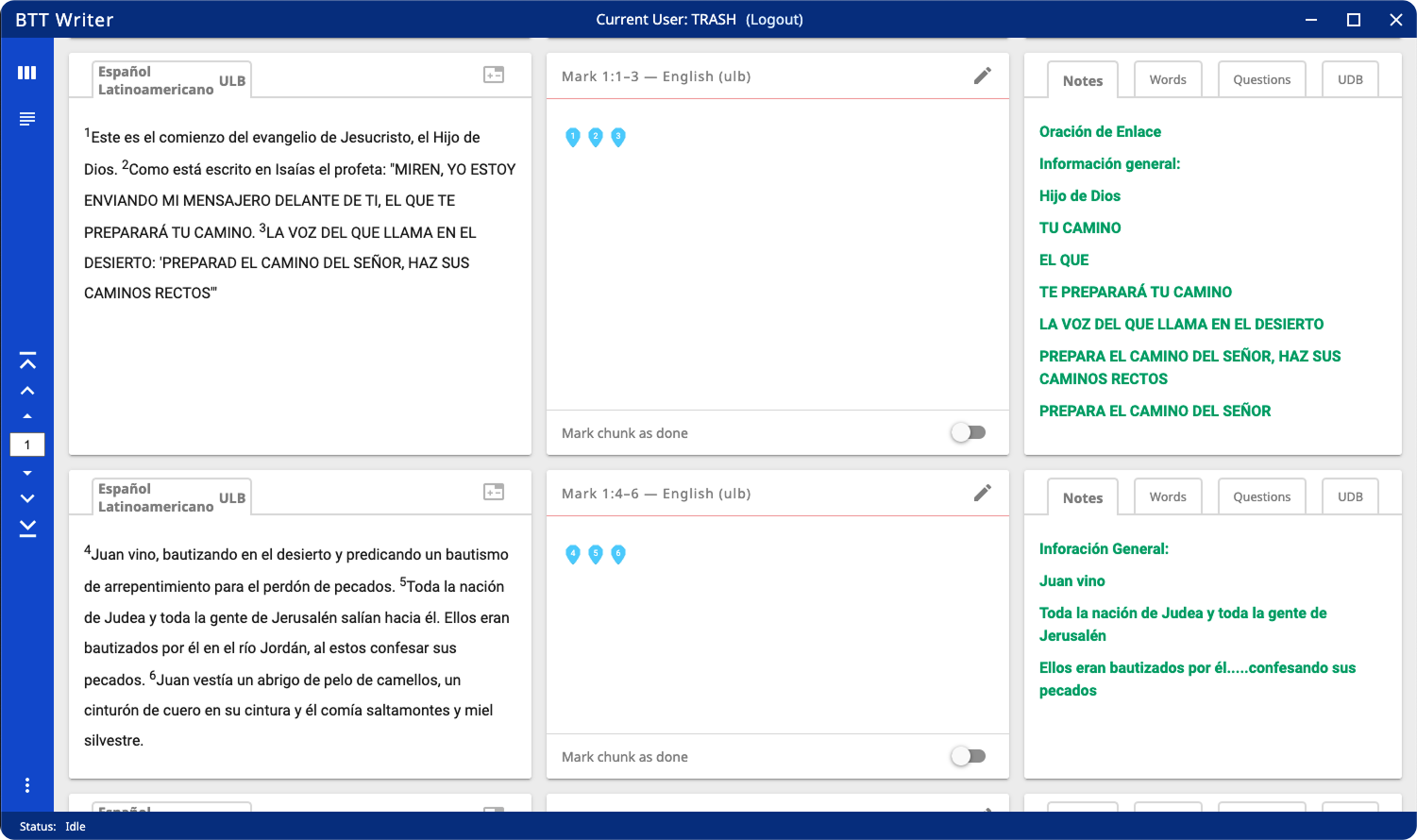
Writer's chunk-based navigation model requires active structural management to move through a document, adding interaction overhead that word processors like Word eliminate entirely.
Research & Discovery
Stakeholder-Driven Problem Definition
Dovetail originated from sustained stakeholder pressure — multiple teams independently reporting that the current workflow was painful, didn't scale, and had no path forward without new tooling. Simultaneously, the organization was formalizing its approach to the refinement phase of translation for the first time, creating an immediate need for software to support it. This convergence of user pain and organizational readiness made Dovetail a high-priority initiative.
Mapping the Workflow
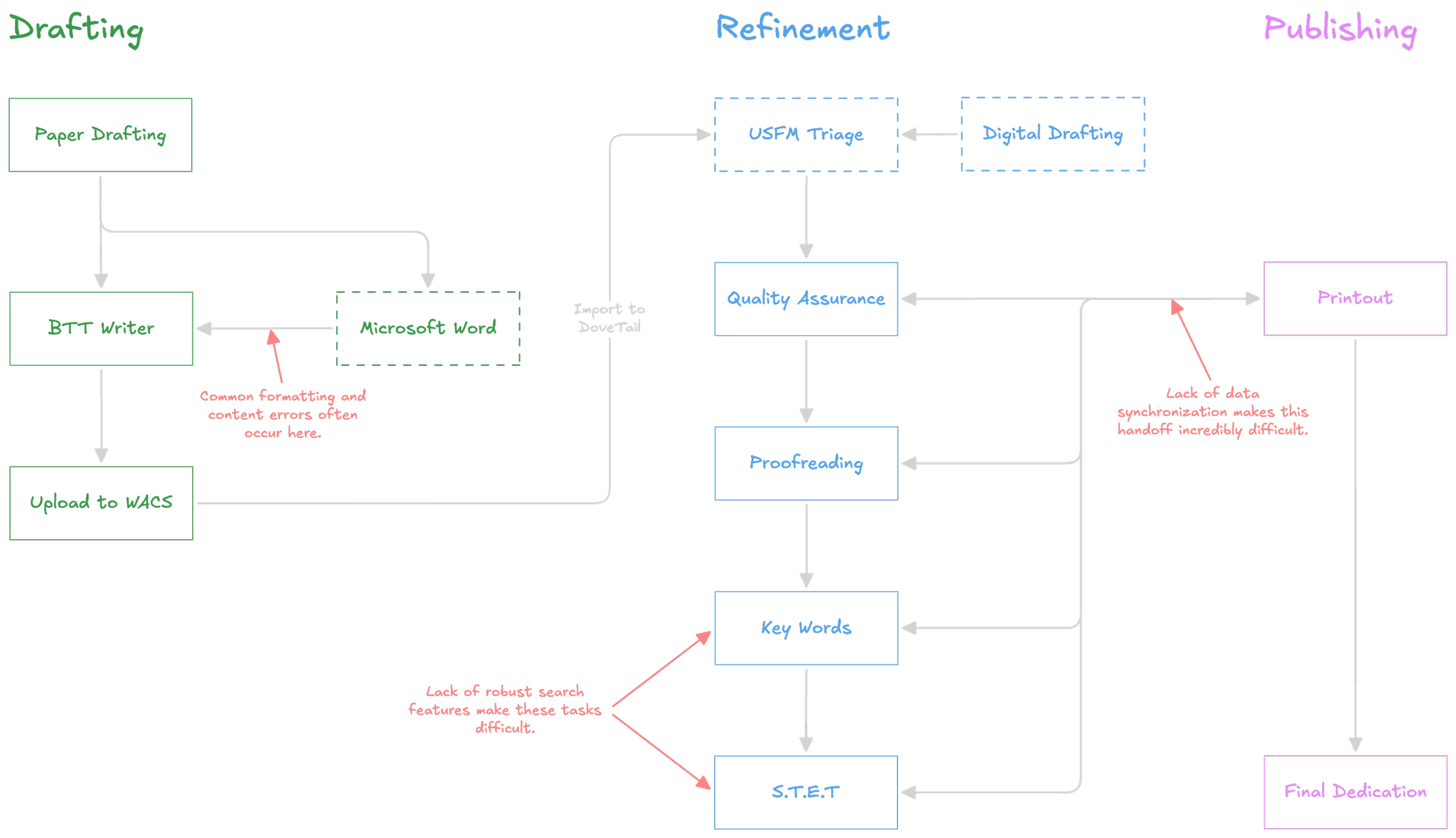
Before designing anything, the full translation lifecycle needed to be mapped — from pen-and-paper drafting through digital transcription, USFM triage, refinement, and publishing. The diagram below illustrates this workflow and where the most significant pain points occur.
The entire lifecycle a translation goes through from start to finish.
The back-and-forth between Refinement and Publishing is where the collaboration gap is most felt. Corrections made by publishing currently have no path back to the translation team's source files without manual re-entry. This easily creates:
Version drift
Duplicated effort
Data loss
Pen-and-paper drafting is not a workaround; for most teams sharing one or two devices, it's a practical necessity. The real problem begins at transcription, where content enters a digital workflow that has no reliable structure or synchronization from that point forward.
Defining the Collaboration Model
One of the most complex research questions Dovetail faces is how to handle document collaboration in an environment where teams share one or two laptops and work primarily offline. Several models were evaluated:
A Git-style branching approach offered version control robustness but introduced conceptual complexity that would be unrealistic for most users to manage independently.
A content checkout model — locking one chapter per user at a time while allowing others to participate as commenters — emerged as the most viable approach given real-world hardware constraints. Most refinement work happens at the chapter level, making per-chapter locking a natural fit that adds minimal friction to existing workflows. Edge cases exist where a user needs to make changes across multiple chapters simultaneously, but given that most teams share only one or two devices, contention is unlikely in practice.
A single-editor, multi-commenter model similar to Google Docs comment-only access was also considered as a lower-complexity fallback that could be implemented more quickly.
This decision remains open pending alignment with key stakeholders, but the research has narrowed the viable options and defined the tradeoffs clearly.
Field Patterns: Ad-Lib USFM
One of the more revealing research insights came from examining how translation teams were already handling verse markers in their written drafts. Rather than using the correct USFM syntax, users had developed a wide variety of informal shorthand:
"V1" , "1", "vs1", "1."
all intended to represent the proper marker \v 1. The variations were consistent enough to show clear intent, but inconsistent enough to cause structural errors when content was transcribed digitally.
This pattern directly informed a feature in the editor prototype: an auto-formatting system that recognizes these common ad-lib inputs and automatically converts them to the correct USFM marker on import. Rather than requiring users to learn and apply markup syntax correctly — an unrealistic expectation given training time constraints — the editor meets users where they already are and handles the conversion silently.
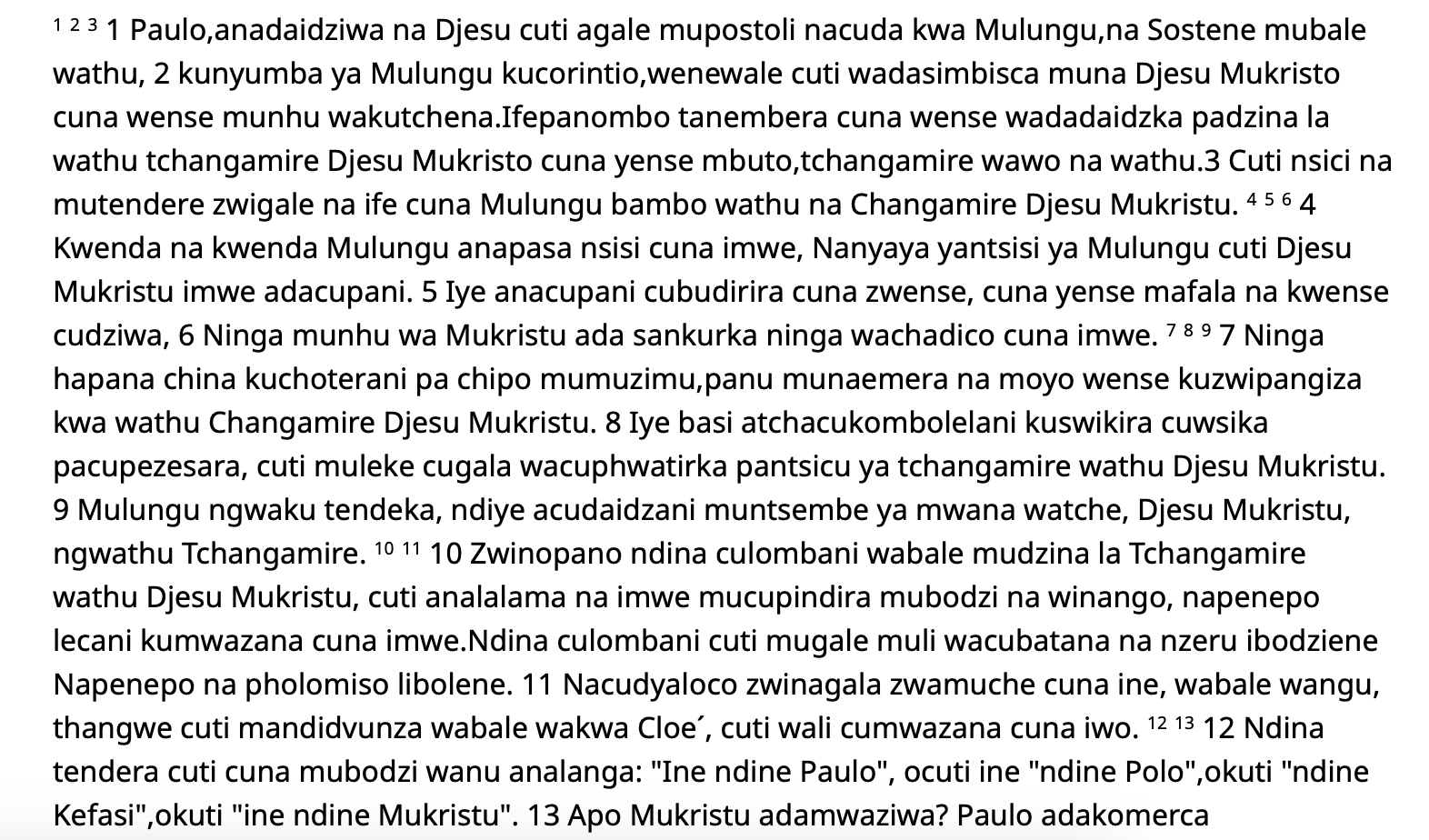
An example document that highlights our translator’s shorthand.
Key Findings
Editor Modes
A core product decision for Dovetail was determining how to present content to users during different phases of the refinement workflow. The answer turned out not to be a single approach, but two complementary modes serving distinct needs.
“WYSIWYG” Mode
This was a firm stakeholder requirement from the start — and for good reason. Refinement teams frequently work alongside printed copies of their translation, and a rendered view that closely mirrors the final printed output makes it significantly easier to align digital and physical versions. It also gives users more direct control over print-relevant formatting decisions:
Line breaks
Quotations,
Footnotes,
and Poetry structure
are all more naturally communicated in a rendered view than in markup. WYSIWYG is the primary working environment for refinement proper.
Form Mode
This mode emerged from a specific research question about pre-refinement triage. Dovetail assumes incoming USFM files meet a minimum structural standard — that all verses are present and correctly aligned with their markers. In practice, this assumption frequently fails. Documents arrive with
Verse content misaligned across boundaries
Numbers appearing where USFM markers should be
Empty verse clusters where content has been displaced.
These structural problems are difficult to identify and fix in a rendered view because the rendering obscures the underlying issue.
To test whether a form-based approach could make this triage work more accessible, proxy users were given documents with common structural errors and asked to correct them under both conditions.
In the WYSIWYG condition, several participants failed to complete the task entirely, and those who succeeded required significant guidance.
Participants using the form mode completed the task in roughly half the time. Users with limited dexterity found the discrete, field-by-field structure significantly easier to interact with, and participants reported greater confidence throughout.
The finding didn't replace WYSIWYG — it defined where each mode belongs. Form mode is now planned as a dedicated pre-refinement view for structural cleanup before the refinement workflow begins. WYSIWYG handles everything after. A raw USFM view is also available for technically proficient users who need direct markup access, though this is considered an advanced feature rather than a primary workflow. Users move between modes via a manual toggle, with the expectation that preferences will vary by user and task.
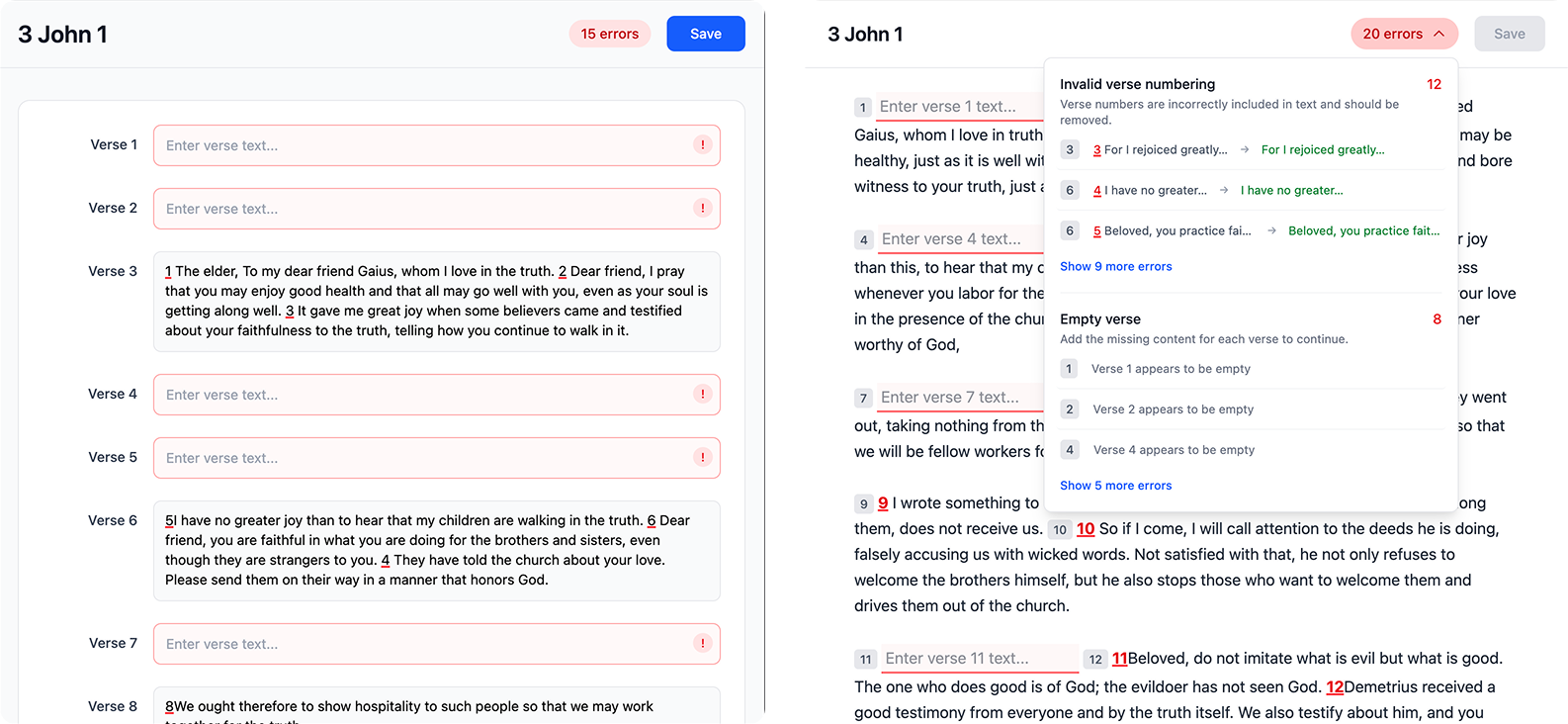
Focused prototypes built with AmpCode to test the pre-refinement workflow, comparing form-based and WYSIWYG interaction models.
Prototypes
Prototyping Approach
The prototyping process for Dovetail has been deliberately iterative and narrow in scope — rather than building a single comprehensive prototype, multiple focused prototypes have been produced to test specific workflows and interaction questions in isolation. This approach has allowed for faster validation cycles and cleaner data, since each prototype removes variables that aren't relevant to the question being tested.
Design-Led Prototypes
My prototypes have been primarily vibe-coded using AmpCode, purpose-built to simulate specific scenarios — the form vs. WYSIWYG editor comparison being the most significant. These are intentionally rough and not representative of final UI quality; their value is in the interaction data they generate, not their polish.
Key findings from prototype testing
Mental model conflicts with existing tools: Users familiar with Writer's chunking system failed to perceive structural errors in WYSIWYG mode — empty verse clusters visually resembled a chunk, making the problem invisible. This confirmed that a rendered view alone cannot surface structural issues for users already conditioned by our existing tooling.
Error reporting confidence and wording precision: Clear, descriptive error reporting significantly increased user confidence and helped participants move forward through the task. However, wording had to be highly precise — ambiguous error messages created more confusion than no message at all. This has direct implications for how errors are communicated in the form mode interface.
Low dexterity and touch target size: Users with limited dexterity struggled to click into empty verse fields in WYSIWYG mode — the available interaction target was too small to reliably select. This finding was a direct driver of the Mad Lib style interaction approach tested in form mode, where each field is a clearly bounded, generously sized input.
Form mode universally preferred for data entry: Across all participants, form mode was considered a significantly better approach to structured data entry — the discrete field-by-field layout reduced errors and made input feel more deliberate and controlled compared to the open-ended nature of a text editor.
Verse marker vs. shorthand disambiguation: Communicating the difference between a real USFM verse marker and user-generated shorthand proved extremely difficult. Visual cues and inline labels were insufficient — the only approach that consistently worked was explicitly spelling out the distinction in the form mode interface, in plain language.
USFM Lite default behaviors: Earlier drafting testing surfaced several default behaviors for the USFM shorthand system worth formalizing — patterns consistent enough across users to warrant building them in as recognized inputs rather than edge cases.
Developer-Built Prototype
In parallel, a developer-built prototype has been used to gather feedback on broader product behaviors and edge cases — surfacing niche use cases and unexpected interactions that wouldn't have been caught in more controlled testing conditions. While my direct involvement in that prototype has been limited, the feedback it's generating is actively informing the design.
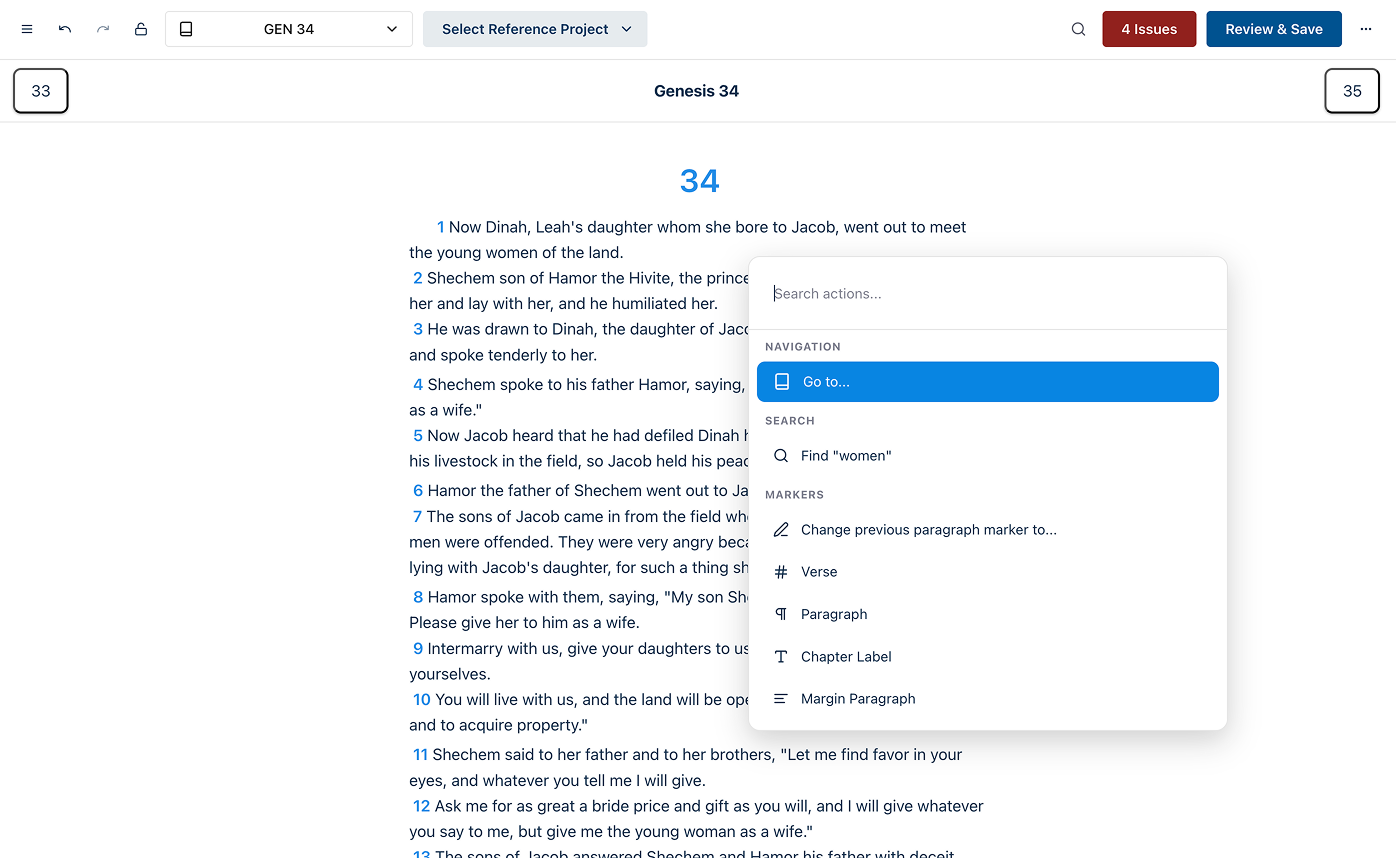
Deployed ahead of design finalization to meet business requirements, this build has been used to QA test features and surface real-world edge cases that controlled testing rarely catches.
What's Been Deferred
Collaboration features remain intentionally out of scope for the current prototype phase, pending stakeholder alignment on the synchronization model. The priority has been validating core editor interactions first — a principle that has proven its value repeatedly across previous projects.
Conclusion
What’s Next
The immediate priorities for Dovetail are:
Stakeholder alignment on the collaboration and content synchronization model,
Continued proxy user testing on edge cases surfacing from current prototype sessions,
Defining the mobile scope — specifically which refinement tasks translate meaningfully to a smaller form factor and which should remain desktop-only.
Final Thoughts
Dovetail represents the clearest expression of how my approach to product design has evolved across my time at Wycliffe Associates. It began with sustained listening — stakeholders describing pain clearly enough that the problem space defined itself. It has progressed through rigorous validation before any production commitment, with research findings overturning an assumed interaction model entirely. And it remains deliberately incomplete in the right places — deferring decisions that require more voices rather than making premature architectural choices that constrain the product later.
The 50% reduction in task completion time isn't the headline. The headline is that several users couldn't complete the task at all under one approach, and every user completed it under another. That's not an optimization — that's a fundamental product direction decision, validated before a line of production code was written.
More Projects
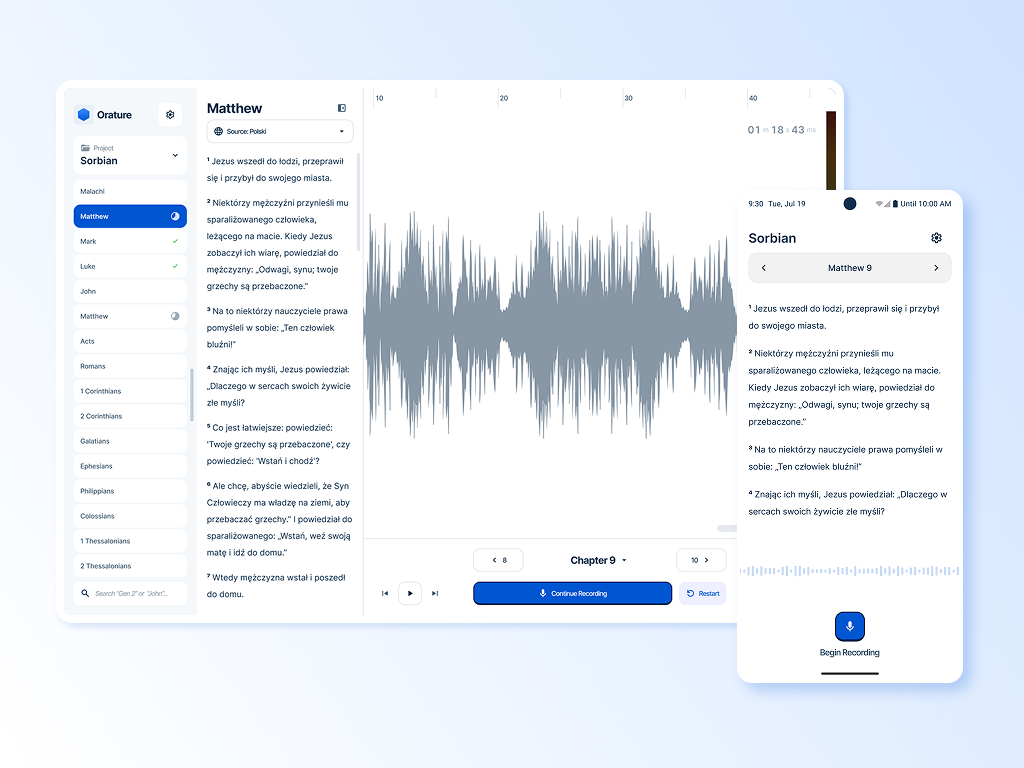
Orature: A desktop oral translation tool that launched with strong technical capability and limited adoption. This case study is an honest post-mortem on what went wrong and includes a full strategic redesign proposal. Read Case Study
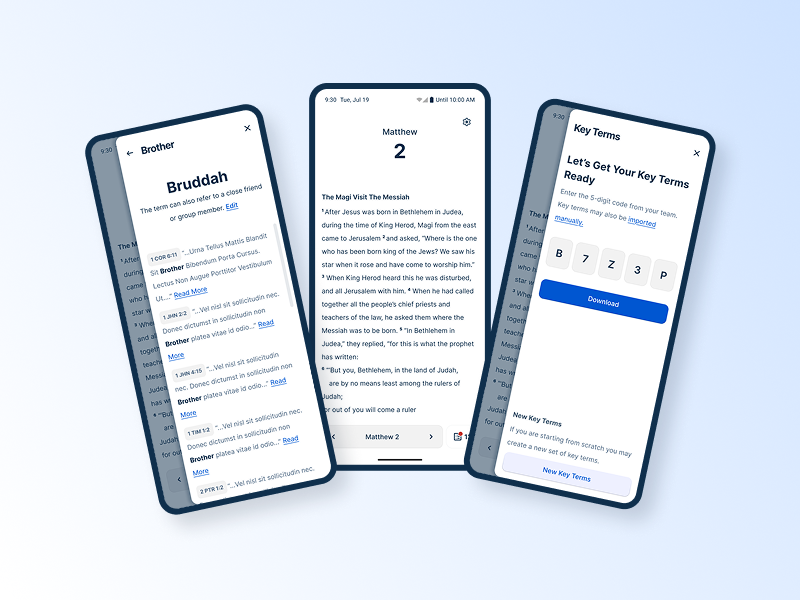
Spotlight: A mobile-first lexicon tool built in direct response to field research. This case study covers the research that drove a platform decision, the usability testing that shaped the design, and what it looked like to validate assumptions in the field. Read Case Study
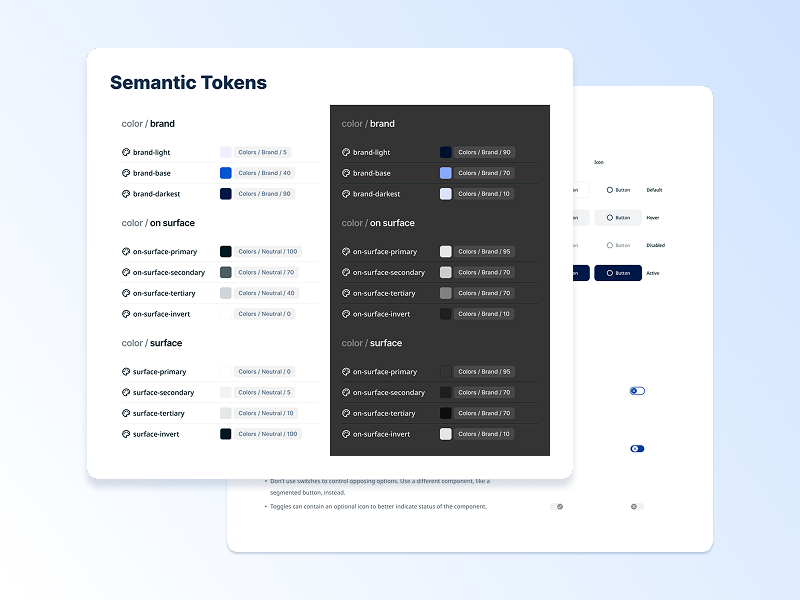
BTT Design System: A cross-product design system built from scratch across five applications. This case study covers the architecture, the tradeoffs, and what building a system without formal governance actually looks like in practice. Read Case Study